We use essential cookies to make this site work. With your permission, we'd also like to use analytics cookies (Google Analytics and our hosting provider's analytics) to understand how the site is used so we can improve it. We don't use advertising cookies. Privacy Policy

Features

What Concept Labels does, in detail.

Each feature below explains what it does, how you use it, and where its limits are. Try most of them in the U.S. interactive demo.

Included with your purchase

Two custom label templates

Your purchase includes two custom label templates, designed with your input to suit your brand and preferred layout.

Tell us what you want, including:

  • Your logo and brand name
  • Colors and background artwork
  • Where each element sits on the label
  • Which information you want shown, such as the nutrition box, badges, instructions and barcode
Discuss your templates
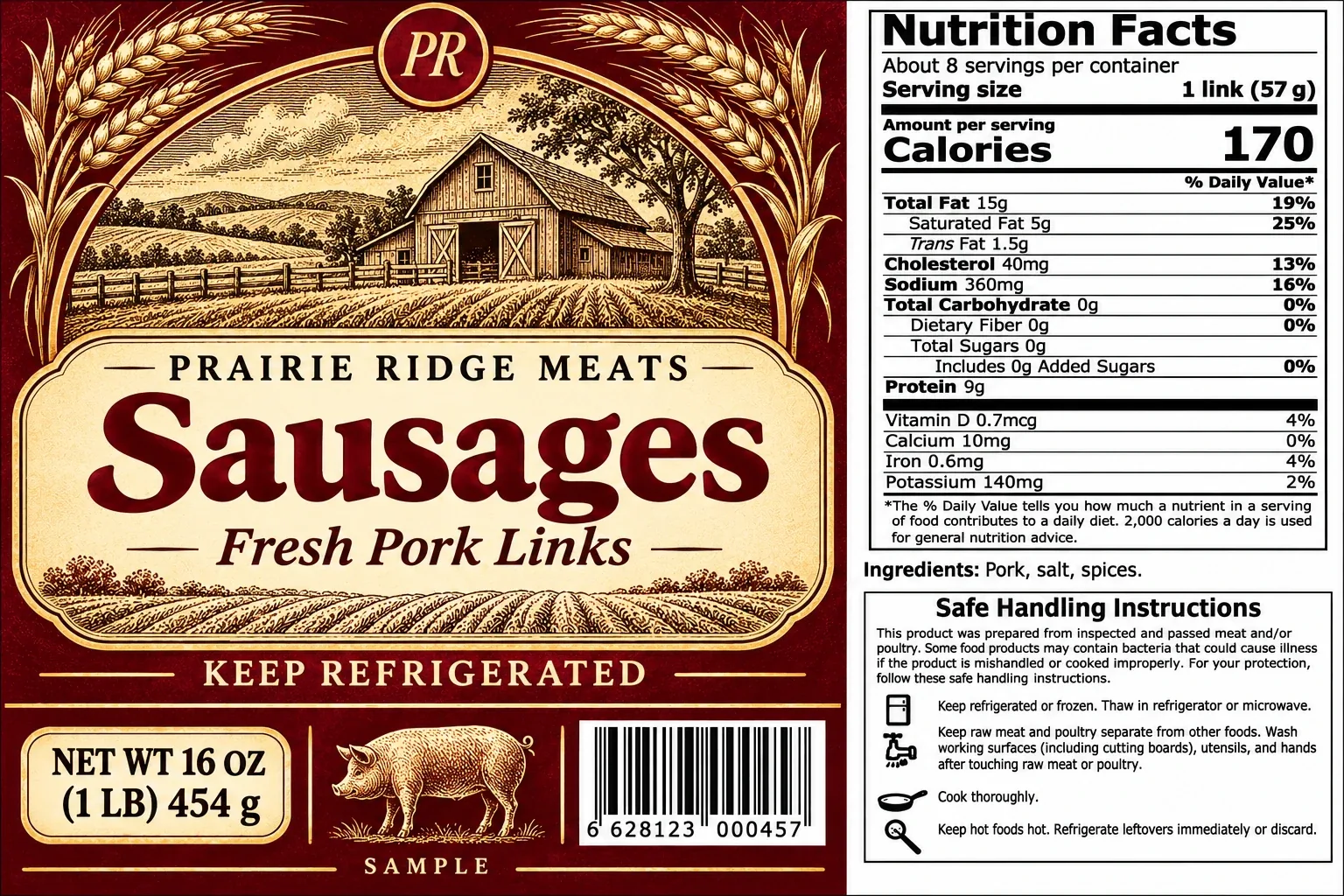
U.S. Prairie Ridge Meats label for Sausages, Fresh Pork Links, on a burgundy template with Nutrition Facts and Safe Handling Instructions

Features

Everything between the recipe and the printed label.

01

Recipe and nutrition tools

Build nutrition from the recipe you already make.

  • Search USDA FoodData Central, the U.S. Department of Agriculture's food composition data.
  • Enter ingredients, quantities, and measurement units for recipe-based nutrition calculation.
  • U.S. serving sizes from the USDA FSIS and FDA reference amounts, with servings per container, plus batch-weight recipe workflows.
  • Photograph or upload a recipe: ingredients and quantities are extracted, you review the database matches, then use them in the nutrition-label workflow.
  • Import typed recipe text, and add custom additives and non-nutritive ingredients.

Photo import is extraction with assisted matching and a review step — not an automatic, unreviewed label.

USDA FoodData Central
Pork shoulder2.00 kg
Pork fat400 g
Maple syrup80 g
Salt38 g
→ per 100 g serving
02

Label library, batches and dates

Save your labels once and reuse them for your next production run.

  • Store saved labels in your label library and reopen them when needed.
  • Reuse an existing label and update its packed-on date and batch details without starting from scratch.
  • Automatically calculate "Best If Used By" dates using a preset number of days that you can set and change.
  • Keep labels organized by product and batch, with previous batches available to review and reprint.

You set the date offset. The software does the date math; it doesn't determine safe shelf life.

B-1004-A
10/04/2026
10/14/2026
B-0927-B
09/27/2026
10/07/2026
B-0920-A
09/20/2026
09/30/2026
batch · packed on · best if used by (+10 d)
03

Branding and live customization

Your logo, your artwork, your layout.

  • Custom logos, product names, net weights, and background artwork.
  • Unlimited customer-uploaded background templates, reusable templates, and saved layout presets.
  • Live label preview: click content to select it, drag supported content to reposition, resize selected content, and fine-tune position and size.
  • English-only U.S. layouts.
  • Optional branding-only labels by hiding the nutrition and ingredients blocks.

Branding-only mode is a design capability, not an automatic regulatory exemption.

Maple Breakfast
Sausage
x 18 · y 100 · 110%
04

Label content tools

The words on the label, written the U.S. way.

  • Automatic allergen detection for the major food allergens, with an editable "Contains" statement and manual override.
  • Custom cooking and storage instructions, Fahrenheit first, with brief smart suggestions.
  • Safe Handling Instructions and handling statements for raw meat and poultry.
  • Selectable No MSG and Gluten Free badges with custom placement and sizing.

Badges are declarations you select. The software doesn't independently certify a product's claims.

NO MSG
GLUTEN FREE
Contains: Milk.
Keep Refrigerated · Safe Handling Instructions
05

Barcodes

UPC from your GS1 US prefix, or internal — clearly separated.

  • UPC barcode generation using your valid GS1 US company prefix.
  • Internal barcode generation without a GS1 prefix, for in-house use.
  • Manual barcode entry with check-digit validation.
  • Barcode placement anywhere supported on the label.

Internal codes are not GS1-registered identifiers.

0012345678905
UPC · your GS1 US prefix
Internal codes labelled separately
06

U.S. labeling support

Built for U.S. food-label workflows, with USDA FSIS and FDA rules and automated label checks.

  • U.S. Nutrition Facts panel with household serving size plus grams, servings per container, % Daily Value and Added Sugars.
  • Net quantity in ounces and pounds with metric, and a "Contains" statement for the major food allergens.
  • Safe Handling Instructions for raw meat and poultry, and U.S. date wording (Packed On, Best If Used By).
  • U.S. label checks before you print, with a draft mark until every check passes.

Checks support your review. You remain responsible for confirming each label meets the requirements for your product.

serving size ✓
Net Wt ✓
Contains ✓
Safe Handling ✓
07

Printing and exports

Print the sizes you actually use.

  • Multiple physical print sizes, such as 6×4, 4×6, 4×4, 4×3, 4×2, and smaller labels.
  • Letter printing and 10-up label sheets, with multiple print copies.
  • PDF and PNG output, with your branding carried into every printed label.
  • Unlimited label printing under the purchase model.

Printer compatibility should be confirmed with your own printer and label stock.

6×44×64×44×34×2SmallLetter10-up
PDF · PNG · multiple copies