Features

What CAIS Labels does, in detail.

Each feature below explains what it does, how you use it, and where its limits are. Try most of them in the interactive demo on the homepage.

Included with your purchase

Two custom label templates

Your purchase includes two custom label templates, designed with your input to suit your brand and preferred layout.

Tell us what you want, including:

  • Your logo and brand name
  • Colours and background artwork
  • Where each element sits on the label
  • Which information you want shown, such as the nutrition box, badges, instructions and barcode
Discuss your templates

Features

Everything between the recipe and the printed label.

01

Recipe and nutrition tools

Build nutrition from the recipe you already make.

  • Search the Canadian Nutrient File (CNF) and USDA FoodData Central — CNF selected by default, with options ordered CNF, USDA, Both.
  • Enter ingredients, quantities, and measurement units for recipe-based nutrition calculation.
  • Serving-size and servings-per-container calculations, plus batch-weight and per-unit recipe workflows.
  • Photograph or upload a recipe: ingredients and quantities are extracted, you review the database matches, then use them in the nutrition-label workflow.
  • Import typed recipe text, and add custom additives and non-nutritive ingredients.

Photo import is extraction with assisted matching and a review step — not an automatic, unreviewed label.

CNFUSDABoth
Pork shoulder2.00 kg
Pork fat400 g
Maple syrup80 g
Salt38 g
→ per 100 g serving
02

Label library, batches and dates

Save your labels once and reuse them for your next production run.

  • Store saved labels in your label library and reopen them when needed.
  • Reuse an existing label and update its packaged date and batch details without starting from scratch.
  • Automatically calculate best-before dates using a preset number of days that you can set and change.
  • Keep labels organized by product and batch, with previous batches available to review and reprint.

You set the best-before offset. The software does the date math; it doesn't determine safe shelf life.

B-1004-A
2026 OC 04
2026 OC 14
B-0927-B
2026 SE 27
2026 OC 07
B-0920-A
2026 SE 20
2026 SE 30
batch · packaged · best before (+10 d)
03

Branding and live customization

Your logo, your artwork, your layout.

  • Custom logos, product names, net weights, and background artwork.
  • Unlimited customer-uploaded background templates, reusable templates, and saved layout presets.
  • Live label preview: click content to select it, drag supported content to reposition, resize selected content, and fine-tune position and size.
  • Bilingual layout options.
  • Optional branding-only labels by hiding the nutrition and ingredients blocks.

Branding-only mode is a design capability, not an automatic regulatory exemption.

Maple Breakfast
Sausage
x 18 · y 100 · 110%
04

Label content and bilingual tools

The words on the label, in both languages.

  • Automatic allergen detection from committed ingredients, with editable declarations and manual override.
  • English/French ingredient and instruction translation support.
  • Custom cooking and storage instructions, with brief smart suggestions.
  • Selectable Raw Meat, No MSG, and Gluten Free badges with custom placement and sizing.

Badges are declarations you select. The software doesn't independently certify a product's claims.

RAW MEATVIANDE CRUE
NO MSGSANS GMS
GLUTEN FREESANS GLUTEN
Contains: milk, mustard.
Contient : lait, moutarde.
05

Barcodes

GS1-based or internal — clearly separated.

  • GS1-based barcode generation using your valid registered company prefix.
  • Internal barcode generation without a GS1 prefix, for in-house use.
  • Manual barcode entry with check-digit validation.
  • Barcode placement anywhere supported on the label.

Internal codes are not GS1-registered identifiers.

0628123000457
GS1-based · your prefix
Internal codes labelled separately
06

Canadian labelling support

Built for Canadian food-label workflows, with bilingual tools and automated FOP compliance checks.

  • Bilingual nutrition-label workflows and serving-size tools.
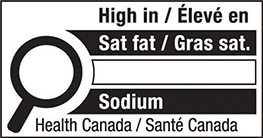
  • Automated front-of-package (FOP) nutrient-threshold assessment, with applicable exemption controls.
  • FOP symbol sizing, placement, and buffer checks.
  • Compliance status and review feedback before you print.

Checks support your review. You remain responsible for confirming each label meets the requirements for your product.

Health Canada nutrition symbol
size ✓
upper half ✓
buffer ✓
07

Printing and exports

Print the sizes you actually use.

  • Multiple physical print sizes, such as 6×4, 4×6, 4×4, 4×3, 4×2, and smaller labels.
  • Letter printing and 10-up label sheets, with multiple print copies.
  • PDF and PNG output, with your branding carried into every printed label.
  • Unlimited label printing under the purchase model.

Printer compatibility should be confirmed with your own printer and label stock.

6×44×64×44×34×2SmallLetter10-up
PDF · PNG · multiple copies